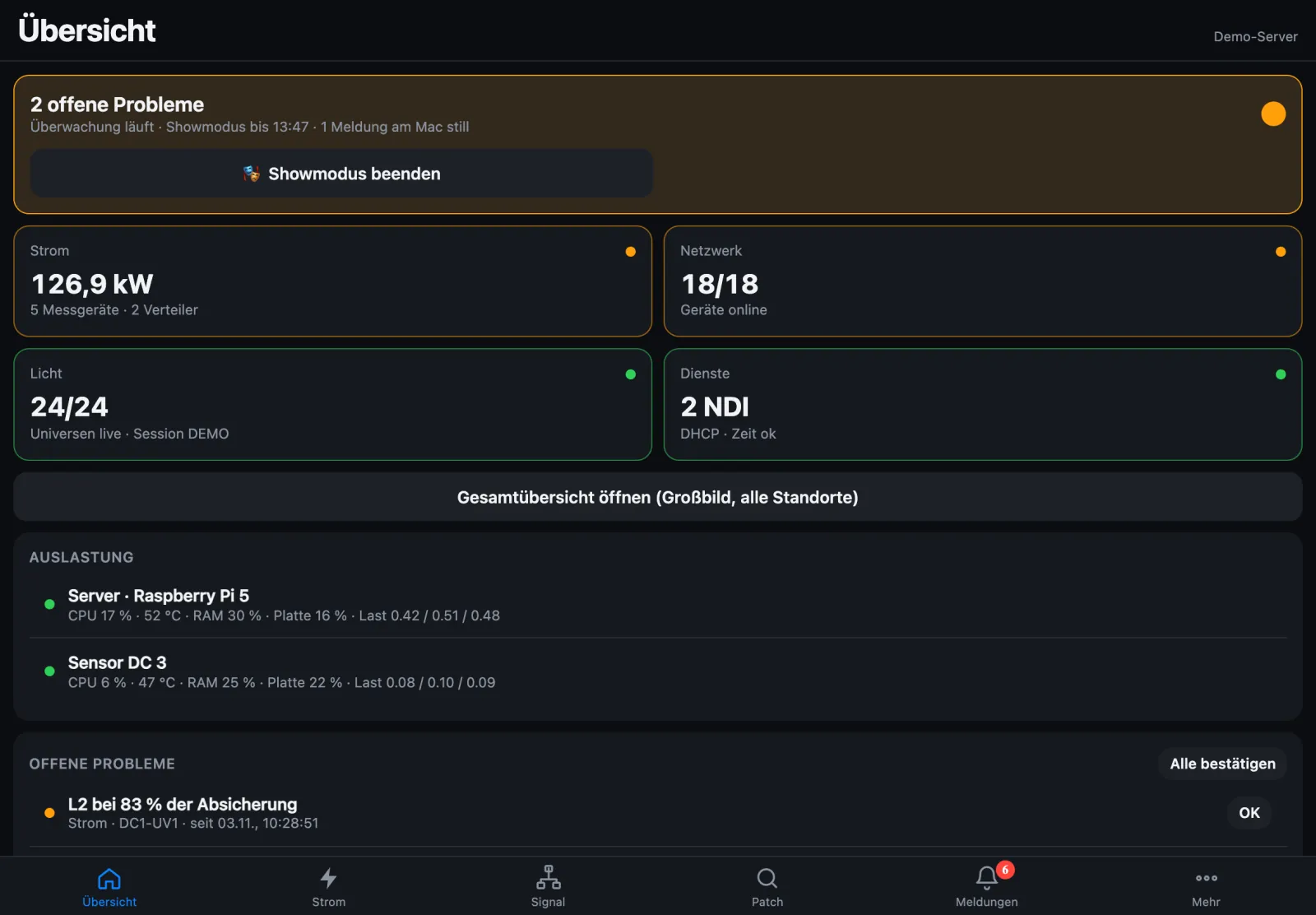
Around the clock on a Raspberry Pi, the Mac as client, distros via USB onto the network.
Screenshots show the app in German with demo data; English screenshots follow with version 1.4.
The server on the show network
StageSense runs headless as a server on a Raspberry Pi 5 and monitors power, lighting and network around the clock – whether or not a Mac is on the show network. You operate it via the web app in the browser or from the Mac; setup is done on the Mac.
The web app overview also shows the load of server and bridges: CPU, temperature, memory, disk and load – with a warning on undervoltage or throttling.
Raspberry Pi 5 with 8 GB, NVMe SSD and the official power supply; a Pi 4 with a 64-bit system works too. No monitor or keyboard needed. What you need
What the server does
Meters, StageSmarts and UPS, network with ping, SNMP and services, lighting with Art-Net, sACN, MA-Net and RDM status, problems, alarms, sites, web app, push and blackbox – just like the Mac. Plus USB UPS and MRG/connex distros directly on the Pi.
Client mode
When a server is in use, the Mac app becomes a client: the same interface, but state, settings and buttons belong to the server. The Mac then monitors nothing itself and sends nothing into the show network.
Pairing and updates
Pair Mac and server or bridge with a pairing code, a click or a QR code. Updates are installed from the device account right in the browser – signed, only to newer versions and never in show mode.
Overview on an HDMI monitor
If a monitor is connected to the Pi, it shows a calm overview instead of a login, refreshed every 3 seconds.
Capture and energy archive
On a Pi 5 with NVMe the server records MA-Net traffic over hours as a pcap file and keeps the minute values of every meter permanently – for histories over days and tours.
Time without internet
The server can be the time server for the show network; without internet and without an RTC battery it takes the time from the licence server or a paired Mac.
SNMP for Zabbix & co.
The server can publish all its meters via SNMP – read-only, off by default. That way the power values also end up in Zabbix or LibreNMS.
StageSense Bridge
A Raspberry Pi 4 makes MRG/connex distros readable on the network through their USB socket “NW” – read-only, as Modbus TCP. The Mac app reads bridges just like the server. Up to 3 distros per Pi, more via an active USB hub. Every bridge is activated on the licence server; one bridge licence is included with every PC licence.
Licence without internet
If the Pi has no internet on site, the phone or laptop you open the web app with activates the licence for it.
Macs without internet New in 1.3.5
When the online confirmation of a paired Mac is due soon, it reports to the server. In the web app under More → Licence, “Confirm via this device” fetches the confirmation through the phone or laptop – only the Mac’s licence number goes to the licence server.